【笔记】【Android】事件分发
简述
在Android开发中会遇到多个View、ViewGroup嵌套的情景,例如ViewPager中嵌套Fragment,同时在Fragment内嵌套一个可滚动的RecyclerView,就会出现ViewPager和RecyclerView的滑动事件就会冲突,这时候就需要处理触摸事件。
一次完整的事件传递分为三个阶段,分别是事件的分发、拦截和消费。
触摸事件和类型
触摸时间对应的是MotionEvent类, 事件的类型主要有三种:
– ACTION_DOWN: 用户的按下操作, 一个按下操作标志着一次触摸时间的开始。
– ACTION_MOVE: 用户按下后松开前, 如果移动的距离超过阈值, 则判定为ACTION_MOVE操作。
– ACTION_UP: 用户抬起操作, 一个抬起操作标志着一次触摸事件的结束。
在一次屏幕触摸操作中,ACTION_DOWN和ACTION_UP这两个事件是必需的, 而ACTION_MOVE需移动触发。
事件传递的三个阶段
- 分发(Dispatch): 事件的分发对应
dispatchTouchEvent方法 , 在Android中 , 所有的触摸事件都是通过这个方法分发的:
override fun dispatchTouchEvent(event: MotionEvent?): Boolean
在这个方法中国,根据实际的实现逻辑来决定这个事件是否继续分发给子视图处理。当方法返回true时, 表示该事件被消费, 不再分发; 方法返回super.dispatchTouchEvent则表示继续分发事件。如果当前视图是ViewGroup及其子类, 则会调用onInterceptTouchEvent判定是否拦截该事件。
- 拦截(Intercept) : 事件的拦截对应着
onInterceptTouchEvent, 这个方法仅在ViewGroup及其子类存在, 在View和Activity中不存在。
override fun onInterceptTouchEvent(ev: MotionEvent?): Boolean
同理, 此方法也是通过返回值来决定是否拦截事件 , 当返回true时, 表示拦截事件, 不继续分发给子视图, 同时交由自身的onTouchEvent方法进行消费。
- 消费(Consume) : 事件的消费对应
OnTouchEvent方法:
override fun onTouchEvent(event: MotionEvent?): Boolean
此方法返回true表示当前View可以处理消费对应的事件 , 事件将不会向上传递给父View; 返回false表示不消费事件, 事件会向上传递给俯视图的OnTouchEvent方法。
拥有事件传递处理能力的类有三个:
– Avtivity: dispatchTouchEvent和onTouchEvent
– ViewGroup : dispatchTouchEvent、onInterceptTouchEvent和onTouchEvent
– View : dispatchTouchEvent和onTouchEvent
View的事件传递机制
我们首先定义一个继承TextView的类MyTextView (不继承ViewGroup及其子类)。
class MyTextView : TextView {
    private val TAG="binbinMyTextView"

    …………

    override fun dispatchTouchEvent(event: MotionEvent?): Boolean {
        var actionStr=""
        when (event?.action){
            MotionEvent.ACTION_DOWN ->{
                actionStr="ACTION_DOWN"
            }
            MotionEvent.ACTION_UP ->{
                actionStr="ACTION_UP"
            }
            MotionEvent.ACTION_MOVE ->{
                actionStr="ACTION_MOVE"
            }
            MotionEvent.ACTION_CANCEL->{
                actionStr="ACTION_CANCEL"
            }
            else ->{
                actionStr="else"
            }
        }
        e(TAG,"dispatchTouchEvent $actionStr")
        return super.dispatchTouchEvent(event)
    }

    override fun onTouchEvent(event: MotionEvent?): Boolean {
        var actionStr=""
        when (event?.action){
            MotionEvent.ACTION_DOWN ->{
                actionStr="ACTION_DOWN"
            }
            MotionEvent.ACTION_UP ->{
                actionStr="ACTION_UP"
            }
            MotionEvent.ACTION_MOVE ->{
                actionStr="ACTION_MOVE"
            }
            MotionEvent.ACTION_CANCEL->{
                actionStr="ACTION_CANCEL"
            }
            else ->{
                actionStr="else"
            }
        }
        e(TAG,"onTouchEvent   $actionStr")
        return super.onTouchEvent(event)
    }

}
然后再定义一个Activity展示MyTextView并设置点击和触摸监听。
class MainActivity : AppCompatActivity() ,View.OnTouchListener,View.OnClickListener{
    private val TAG="binbinMainActivity"
    override fun onCreate(savedInstanceState: Bundle?) {
        super.onCreate(savedInstanceState)
        setContentView(R.layout.activity_main)
        findViewById<MyTextView>(R.id.myTextView).setOnClickListener(this)
        findViewById<MyTextView>(R.id.myTextView).setOnTouchListener(this)
    }

    override fun dispatchTouchEvent(ev: MotionEvent?): Boolean {
        var actionStr=""
        when (ev?.action){
            MotionEvent.ACTION_DOWN ->{
                actionStr="ACTION_DOWN"
            }
            MotionEvent.ACTION_UP ->{
                actionStr="ACTION_UP"
            }
            MotionEvent.ACTION_MOVE ->{
                actionStr="ACTION_MOVE"
            }
            MotionEvent.ACTION_CANCEL->{
                actionStr="ACTION_CANCEL"
            }
            else ->{
                actionStr="else"
            }
        }
        e(TAG,"dispatchTouchEvent  $actionStr")
        return super.dispatchTouchEvent(ev)
    }

    override fun onTouchEvent(event: MotionEvent?): Boolean {
        var actionStr=""
        when (event?.action){
            MotionEvent.ACTION_DOWN ->{
                actionStr="ACTION_DOWN"
            }
            MotionEvent.ACTION_UP ->{
                actionStr="ACTION_UP"
            }
            MotionEvent.ACTION_MOVE ->{
                actionStr="ACTION_MOVE"
            }
            MotionEvent.ACTION_CANCEL->{
                actionStr="ACTION_CANCEL"
            }
            else ->{
                actionStr="else"
            }
        }
        e(TAG,"onTouchEvent  $actionStr")
        return super.onTouchEvent(event)
    }

    override fun onTouch(v: View?, event: MotionEvent?): Boolean {
        when(v?.id){
            R.id.myTextView ->{
                var actionStr=""
                when (event?.action){
                    MotionEvent.ACTION_DOWN ->{
                        actionStr="ACTION_DOWN"
                    }
                    MotionEvent.ACTION_UP ->{
                        actionStr="ACTION_UP"
                    }
                    MotionEvent.ACTION_MOVE ->{
                        actionStr="ACTION_MOVE"
                    }
                    MotionEvent.ACTION_CANCEL->{
                        actionStr="ACTION_CANCEL"
                    }
                    else ->{
                        actionStr="else"
                    }
                }
                e(TAG,"onTouch  $actionStr")
            }
        }
        return super.onTouchEvent(event)
    }

    override fun onClick(v: View?) {
        when(v?.id){
            R.id.myTextView ->{
                e(TAG,"onClick")
            }
        }
    }

}
运行代码, 点击MyTextView, 得到如下日志:
com.bin.toucheventtest E/binbinMainActivity: dispatchTouchEvent  ACTION_DOWN
com.bin.toucheventtest E/binbinMyTextView: dispatchTouchEvent ACTION_DOWN
com.bin.toucheventtest E/binbinMainActivity: onTouch  ACTION_DOWN
com.bin.toucheventtest E/binbinMyTextView: onTouchEvent   ACTION_DOWN
com.bin.toucheventtest E/binbinMainActivity: dispatchTouchEvent  ACTION_UP
com.bin.toucheventtest E/binbinMyTextView: dispatchTouchEvent ACTION_UP
com.bin.toucheventtest E/binbinMainActivity: onTouch  ACTION_UP
com.bin.toucheventtest E/binbinMyTextView: onTouchEvent   ACTION_UP
com.bin.toucheventtest E/binbinMainActivity: onClick
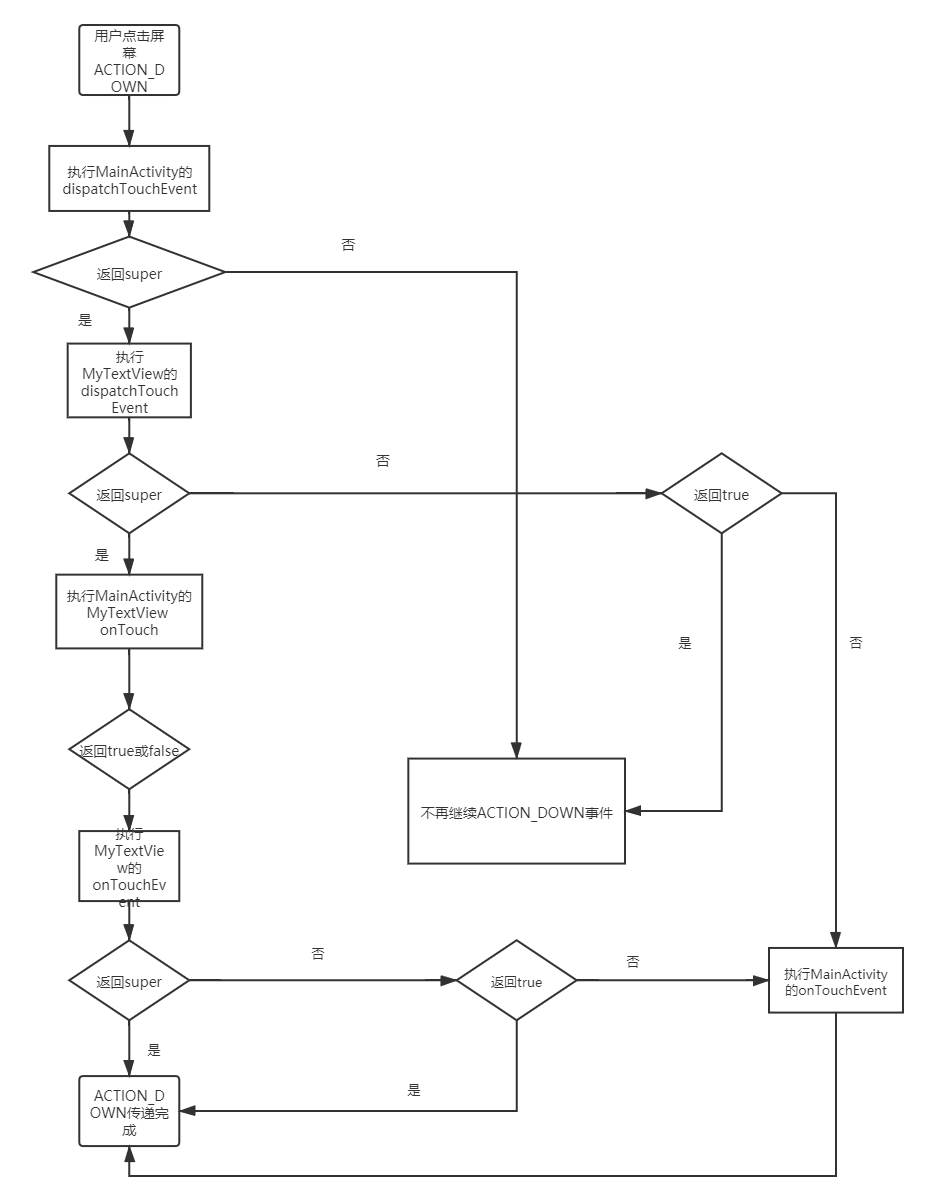
从上面的代码看出, dispatchTouchEvent、onTouchEvent两个方法返回值有三种情况:
– false
– true
– super.同名方法
不同的返回值使事件传递流程走向不同。
ACTION_DOWN事件的处理流程如图: